QSOCardCreator Prerequisites
Windows 64 bit
QRZ account equipped with XML capabilities
N3FJP (ACL), Ham Radio Deluxe (HRD), Log4OM or ADIF.
Access to a SMTP server such as gmail, yahoo..etc. (Microsoft discontinued free)
E-Mail Opt-out for contacts
Your contacts will have the option to opt out of receiving QSOCardCreator cards by adding “NOQSOCC” or “NOEQSL” to the QSL information field on their callsign update page on QRZ.
E-Mail troubleshooting
Most of the big name mail servers allow a copy of out going e-mail to save a copy in the sent folder, which make it easy to check. To check what is truely going wrong.
1. Put the program in test mode on the setup screen.
2. Clear the log.
3. Send an e-mail
4. View the log
If these is an entry saying successfully sent mail. all is good. If it complains of Authenication, you will need to get or re-new APP password.
Ham Radio Deluxe
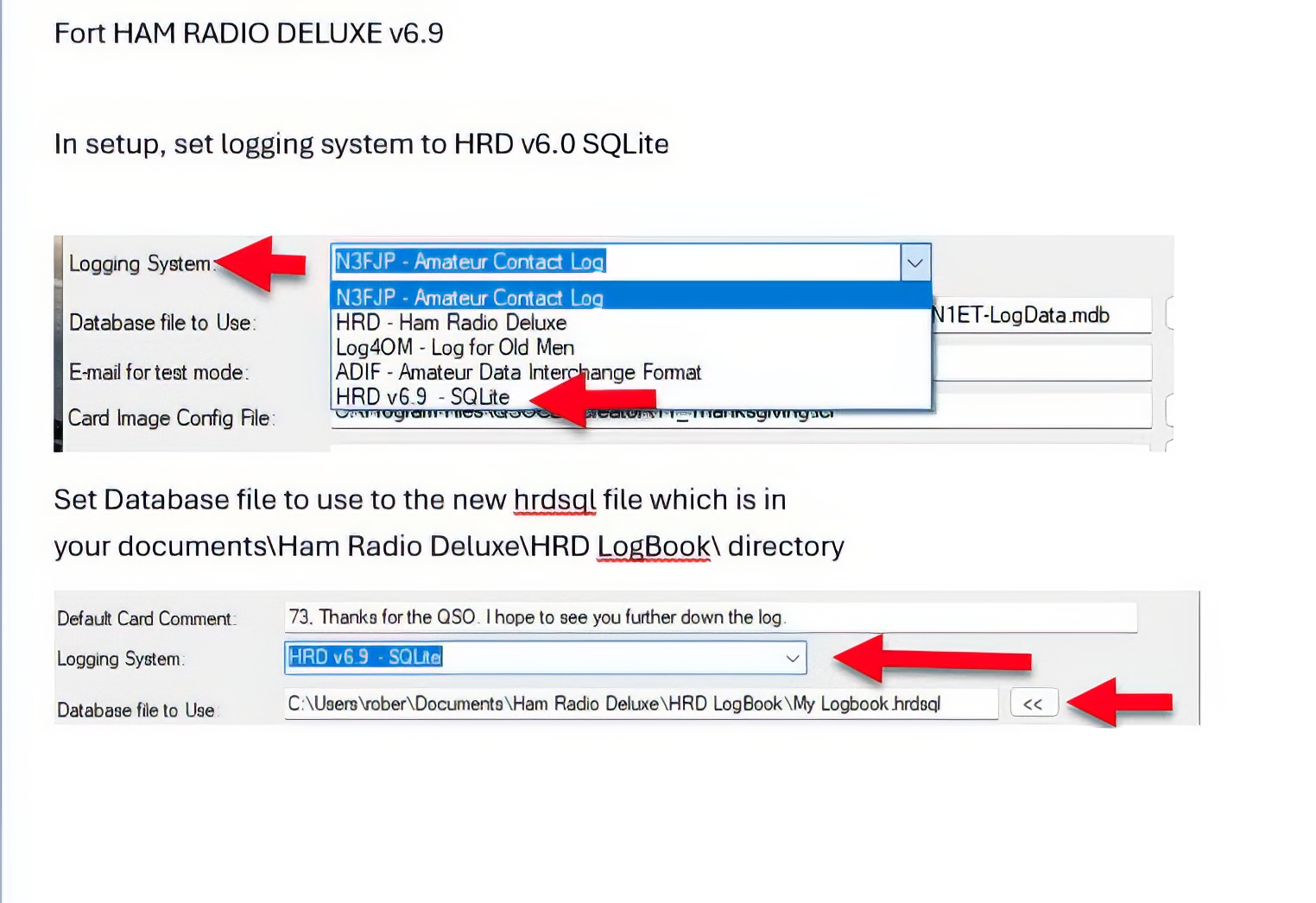
Please be aware there are two different versions of HRD, one prior to HRD 6.9 which used an Microsoft Access Database for the logbook, and the latest which uses SQLite for logging. Be sure to pick the version you are using on QSOCardCreator setup for Logging System, and point to the correst database (Access has a .MDB file extension, while SQLite has a .hrdsql extension).
QRZ Passwords
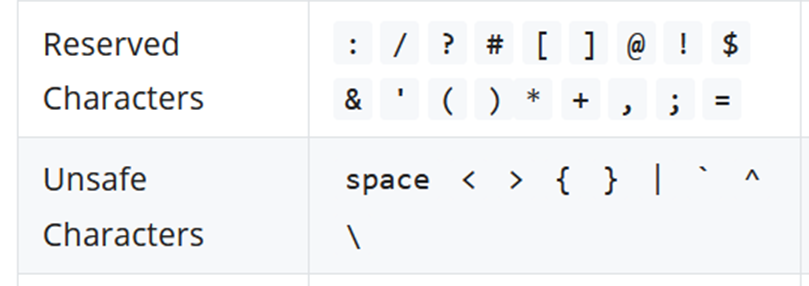
If you are having trouble with QRZ passwords, it is often that you are using a password manager and/or password generator, and there are several characters that cause problems in QRZ passwords. Such as those below.
None of my records show E-Mail
Ensure your QRZ account is paid up and at least at the XML Data level.
Remote Server 500 error
QRZ Server down.
N3FJP Index Error
CREATE INDEX Index_fldCall ON tblConacts (fldCall)”. This is a rare error but once it arrives it normally stays. According to N3FJP the fix is to click File > Save As and enter a new file name from inside N3FJP (ACL). That will create a fresh database with your currently open log file, which resolves the error. Be sure to change to that new database in QSOCardCreator setup.
Database Tools
When you first install QSOCardCreator you may already have thousands of records in your logging software. Although you can select the records and Bulk set, that is very time consuming. There are tools to allow you to pick a begin and end date and mark the records to ignore, so they do not show up when you have “Exclude those already sent” on the main screen of my application. This is helpful as many of your early contacts might be silent keys. The tools are named after the logging system you are using, so be sure to download the correct one. Also make a backup of your database file first. I also choose the count button first to ensure the count seems likely prior to choosing Process.
Here are the links:
N3FJP (ACL)
HRD prior to Version 6.9 (Access DB)
HRD Version 6.9 and later (SQLite DB)
Log4OM
Creating your own cards
Previously 1650x1050 px JPGs were used to make cards, as shown in most videos. However it was determined that using JPG files with a resolution of 1800 x 1200 at 300 dpi yields the most satisfactory results, particularly when borderless printing is considered. A starter.pdf file, serving as a template, is provided within the program directory. Each graphic QSO file must be accompanied by a configuration file with a .icf file extension.
Cards can be created with any graphic program supporting layers, such as Photoshop, Photopea.com, Affinity Photo, Gimp..etc
There is an excellent tool to help you create/modify the necessary Image Configuration File (.ICF). It is called ICFEditor, and can be down loaded by clicking here.
There is also a ZIP file containing miscellaneous logos, data grids, and other items I have gathered while creating cards for others. It is called CardStarterKit.zip and down loadable from here. This file is updated periodically.
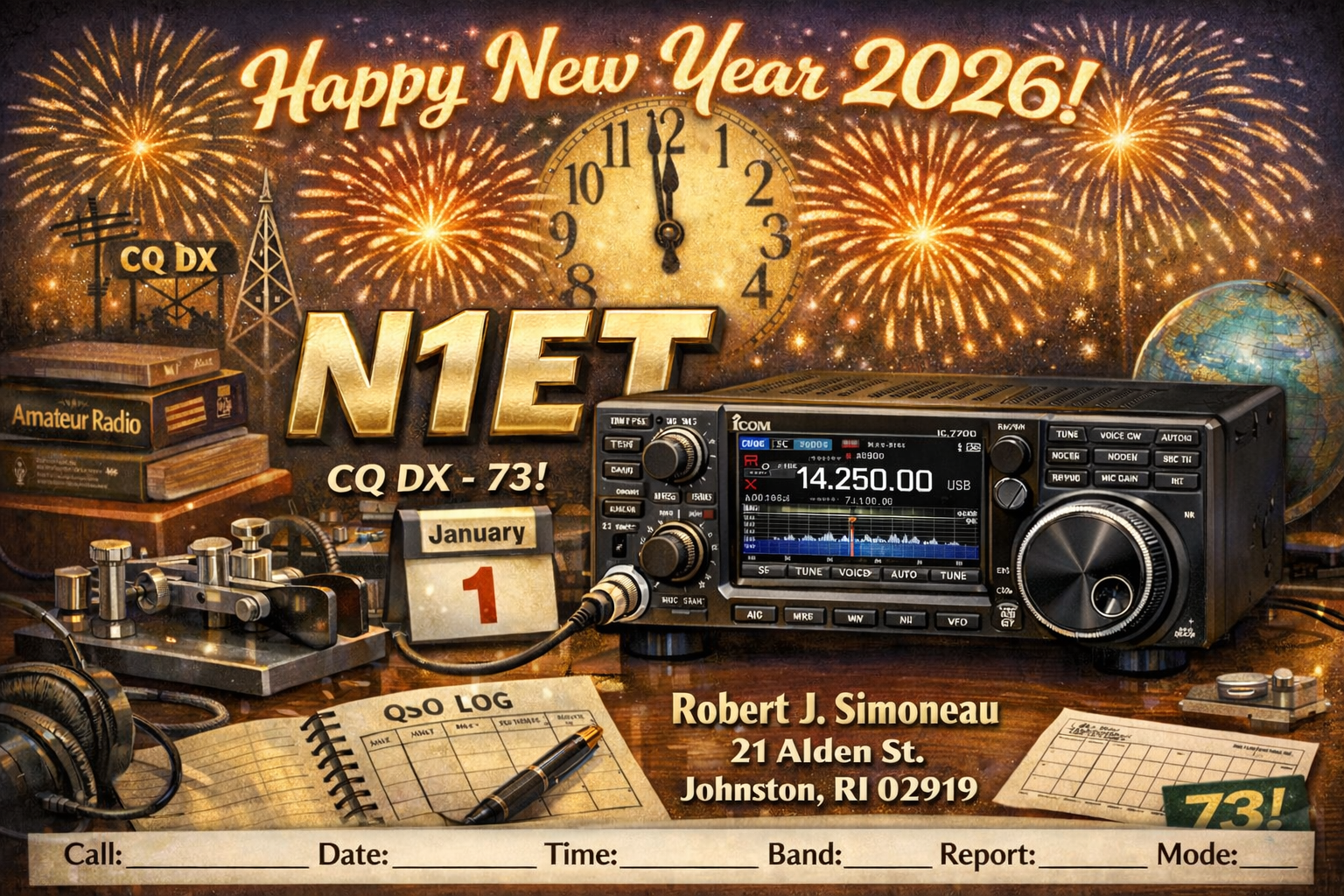
You can get AI application like CharGPT to help you making cards by providing prompts such as:
Can you help me make a QSL New Years card using N1ET as my callsign and personal info of Robert J. Simoneau, 21 Alden St, Johnston, RI 02919. I would like a ic-7300 radio used, and for it to be Ham-radio themed, no pets, 1800pxx1200px 300 dpi, and I only need the front Image created. make it for 2026 and leave space on the bottom for the contact data such as Call, Date, time, Band, Report, and mode to be filled in.